
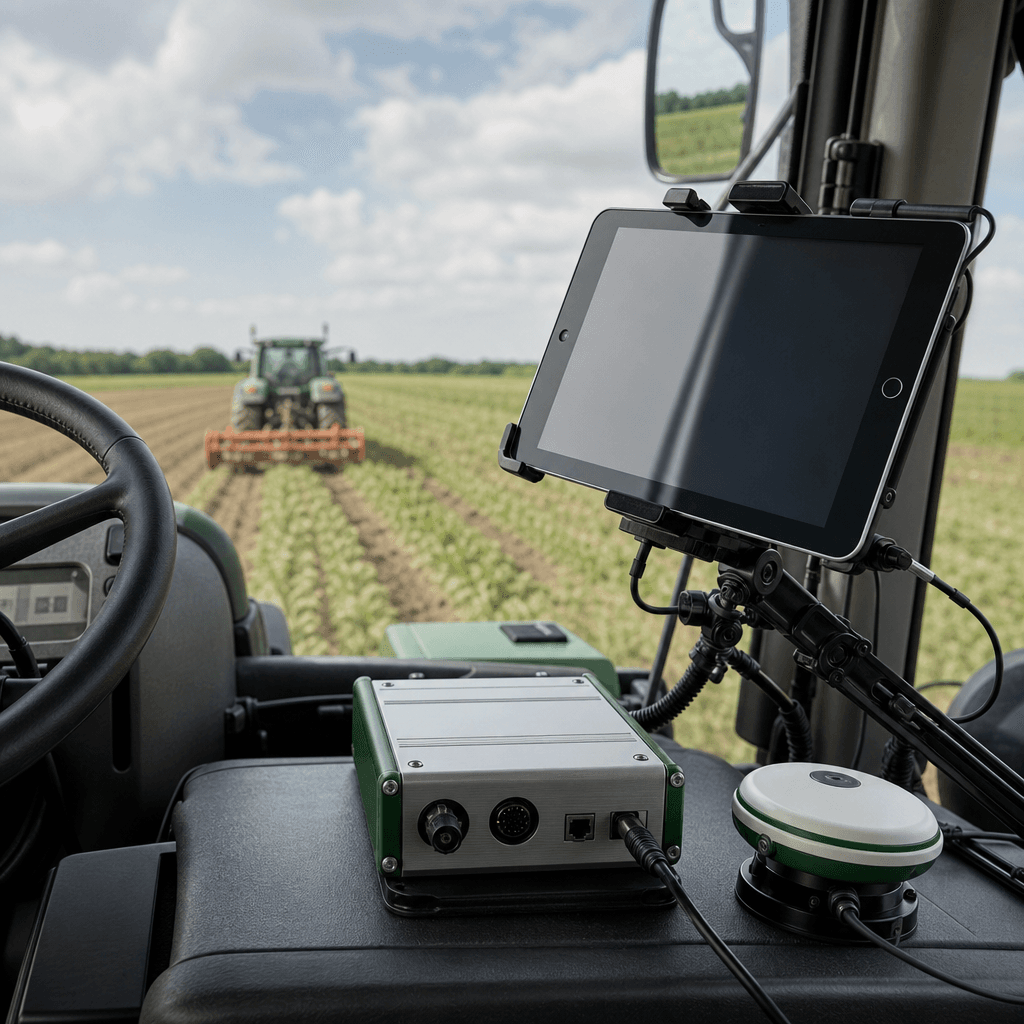
RTK GPS Autosteer for iPad: Precision Farming Without a Windows PC
Every AgOpenGPS autosteer build has quietly assumed the same fragile component in the cab: a Windows tablet or laptop. The community documentation is blunt about it — the standard software "only runs on Windows", which means a machine that dislikes dust, heat, vibration, and direct sun becomes the bottleneck between you and a straight AB line. Agro Navigator was built to remove that dependency. It delivers RTK GPS autosteer for iPad through a native iOS app paired with dedicated autosteer hardware, all still running on the open AgOpenGPS platform. If you already own an iPad or iPhone and a steer-ready tractor, you can reach hands-off guidance without a single Windows device in the cab.
This matters because the tablet is not a minor accessory. It renders the map, carries the guidance logic, and stays connected to your steering hardware for the entire working day. Swapping a temperamental Windows machine for an iPad that farmers already carry, already trust, and already know how to charge changes the reliability equation before you touch a field.
Table of contents
- Why the Windows requirement held AgOpenGPS back
- What the native iOS app actually does in the cab
- Why RTK is the part that makes autosteer worth it
- Two hardware configurations: base wired and 4G/GSM telemetry
- Fitting Agro Navigator to a steer-ready tractor
- Choosing your configuration and next step
- Frequently asked questions
Why the Windows requirement held AgOpenGPS back
AgOpenGPS is a free, open-source guidance and autosteer platform, and that openness is exactly why so many independent farmers adopted it instead of paying for closed proprietary systems. But the traditional path came with a tax that rarely appeared in the parts list: a Windows PC. Community build guides walk operators through sourcing hardware, wiring controllers, and configuring a Windows laptop or tablet as the brain of the setup. That process is documented, workable, and genuinely impressive — and it is also complex and time-consuming.
The practical problems show up after installation. A consumer Windows tablet in an unheated cab faces temperature swings, glare on the screen, driver conflicts when USB devices reconnect, and battery behaviour that was never designed for a full field day. When the tablet stalls mid-pass, guidance stops. For an operator running long hours during a narrow planting or spraying window, that unreliability is expensive.
Agro Navigator's core claim is a direct response to this. It is described as the first AgOpenGPS-compatible system with a dedicated native iOS app, which moves the cab computer off Windows entirely and onto hardware that agricultural operators already own and maintain. Crucially, this is not a fork that abandons the community. The system remains compatible with existing AgOpenGPS boards and RTK receivers, so the openness that attracted people to the platform stays intact. You are changing the device in the cab, not walking away from the ecosystem.
That distinction is the whole editorial point. Independent guidance apps that only show a visual line still ask the driver to steer manually. Full autosteer physically controls the tractor, which demands deeper hardware integration and higher-accuracy signals. Agro Navigator sits in the second category while keeping the open foundation of the first.
What the native iOS app actually does in the cab
The app is the part most operators will interact with every hour, so its behaviour deserves detail. Agro Navigator runs on iOS and iPadOS 17 or later, works on both iPad and iPhone, and is optimised for large-screen iPad use where map visibility across a wide field matters most.
Connectivity is handled through USB. You plug a USB hub into the iPad or iPhone — via Lightning or USB-C depending on your device — and attach the GPS receiver, CAN adapter, or Ethernet bridge. The app then scans and identifies connected USB serial adapters automatically in Settings, which removes one of the classic pain points of DIY builds: hunting for the correct COM port. It supports the common USB-to-serial chip families used in agricultural GPS receivers, including CP210x, CH340, FTDI, and PL2303, so a receiver you already own has a strong chance of being recognised.
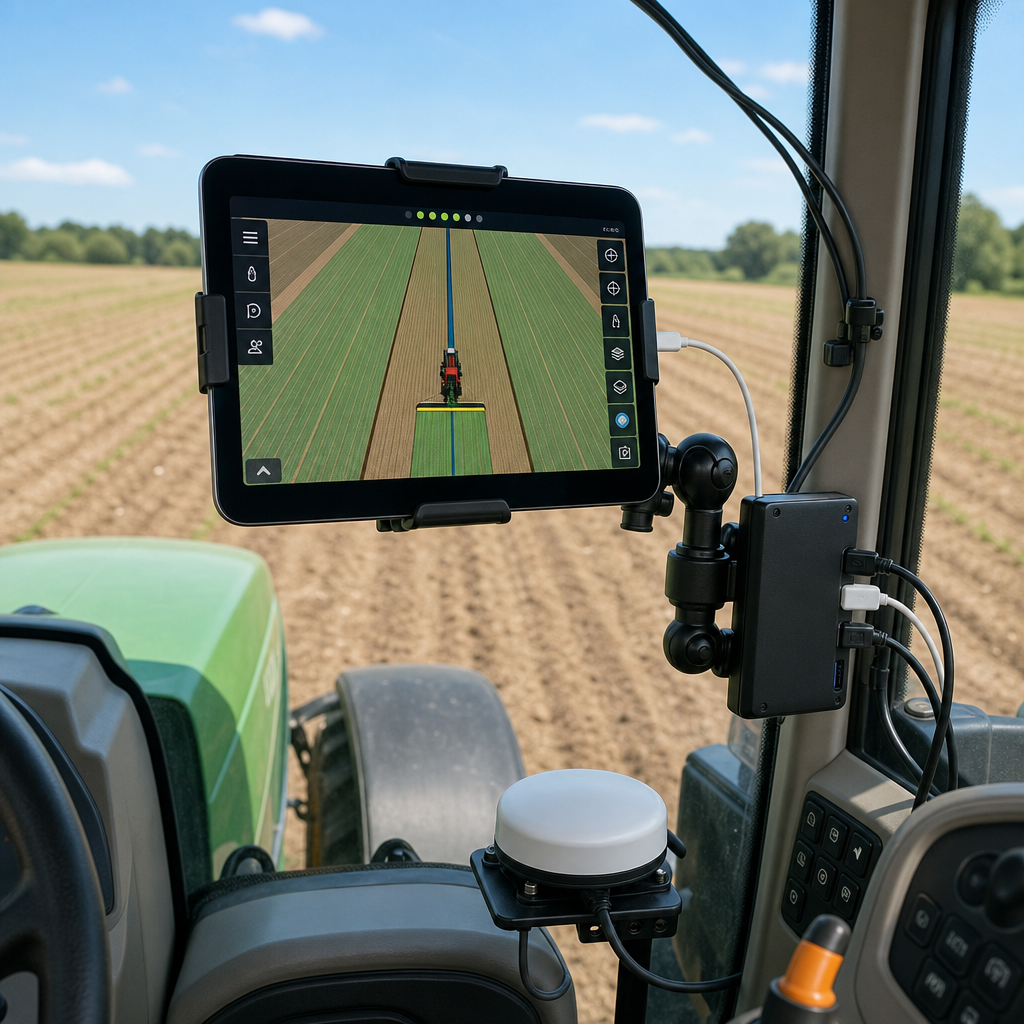
Day-to-day operation centres on two views. The Map tab provides live GPS tracking with satellite, hybrid, and standard map styles, auto-centres on the tractor's location, and updates position in real time even at high working speeds. The Serial tab lets you monitor the raw NMEA data stream directly, which is how you confirm your receiver is delivering clean sentences and holding an RTK fix. That second view is more valuable than it first appears: when guidance behaves oddly, the Serial tab tells you whether the problem is signal quality or something downstream, instead of leaving you to guess.
The setup flow is deliberately short. Plug in the hub, attach your hardware, launch the app, let it detect the adapters, and start tracking. For a farmer who has spent an afternoon fighting Windows driver installations, the contrast is the selling point.
Why RTK is the part that makes autosteer worth it
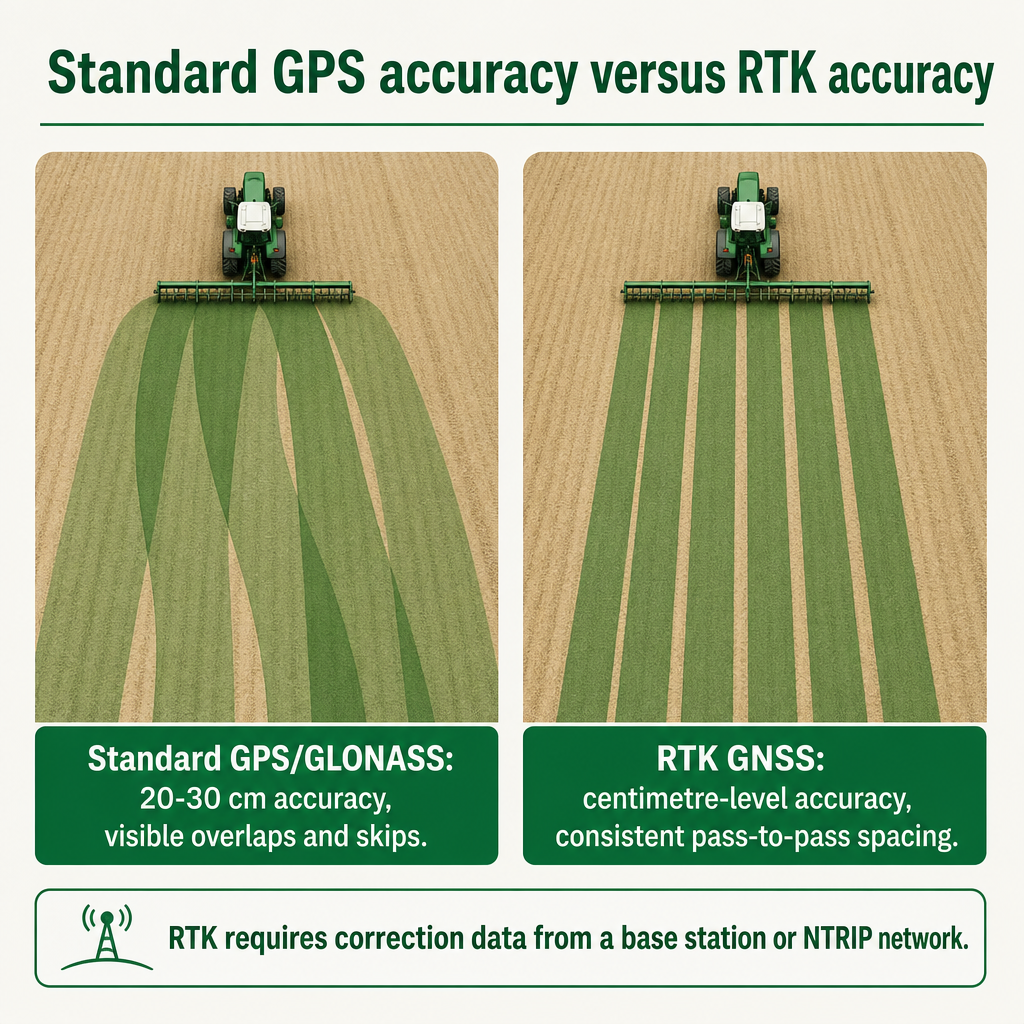
Autosteer is only as good as the position it steers to, and this is where RTK earns its place. Basic GPS or GLONASS guidance typically delivers accuracy in the range of 20 to 30 centimetres — fine for a rough visual line, but not tight enough for confident hands-off passes. RTK GNSS changes the order of magnitude, reaching centimetre-level positional accuracy that far exceeds standard GPS used for simple parallel driving.
That precision is what translates into real field economics: fewer overlaps, fewer skips, less wasted seed, fertiliser, and chemical, and passes that line up cleanly day after day. When the machine is steering itself, the difference between 25 centimetres and a few centimetres of error is the difference between visible tramlines and a paddock that looks like it was drawn with a ruler.
RTK does not arrive for free. It requires correction data from a local base station or an NTRIP network, delivered by radio or over the internet, to maintain that high accuracy. This is a genuine buying decision rather than a footnote. You either subscribe to an RTK/NTRIP service that covers your fields or you deploy your own on-farm base station. The choice affects ongoing connectivity requirements and, for fleets, how consistently correction coverage reaches every machine.
Signal geometry also shapes how well autosteer performs, which is why it pays to understand the factors behind a fix rather than treating RTK as a magic switch. Agro Navigator's own explainer on GPS dilution of precision and autosteer accuracy walks through why satellite arrangement in the sky, not just the receiver, influences the position your steering hardware acts on. Reading it before you commit to a correction source helps you judge whether your typical working conditions will support the accuracy you are paying for.
Two hardware configurations: base wired and 4G/GSM telemetry
Agro Navigator pairs the app with dedicated autosteer hardware that integrates through CAN bus for steer-ready tractors. Two configurations are offered, and the split maps neatly onto two different kinds of operation.
The base wired model connects the iPad to the autosteer control box via Ethernet over USB. It suits single-machine operations and straightforward setups, where RTK corrections come from your receiver or a local network and you do not need remote oversight. Everything happens in the cab, on your device, with a wired link that keeps the connection stable.
The advanced model adds a built-in 4G/GSM modem. That modem enables live telemetry, remote machine monitoring, and fleet management through an online dashboard. RTK corrections and telemetry can be carried over mobile data, which is what makes this version relevant to operations spread across multiple fields or multiple machines. A fleet manager who needs to see where machines are working, without driving to each one, is the intended buyer here.
The operator of both the app and the surrounding services is Agro Navigator / Lagodish Tech, whose privacy policy identifies the business as running the mobile applications alongside product, dealer, support, telemetry, and hardware services. That scope confirms the advanced configuration is backed by an actual telemetry and support ecosystem rather than being an app feature bolted on in isolation.
A few honest limits are worth stating. Detailed public specifications — exact supported tractor brands, electrical interfaces, environmental ratings, mounting kits, pricing, and warranty terms — are best confirmed directly with Agro Navigator before purchase, and the specific reporting and alerting features of the fleet dashboard are worth validating against your own workflow. Planned autonomy capabilities such as predefined path driving and multi-vehicle coordination are described as future releases, so they should factor into your roadmap thinking rather than your immediate buying decision.
Fitting Agro Navigator to a steer-ready tractor
The reason CAN bus integration matters is architectural. Mainstream autosteer systems connect to a tractor's existing steering system and CAN bus to command the steering valves directly, achieving integrated control without bolting on external hydraulic actuators. A "steer-ready" tractor is one that exposes those control interfaces — usually over CAN — so a guidance controller can drive the factory steering. Agro Navigator's CAN-based approach follows this same mainstream pattern, which is why compatibility with the factory steering system is a genuine decision criterion rather than a technicality. Systems that command the built-in steering tend to be cleaner to install and less prone to leaks and wear than retrofitted hydraulic hardware.
A realistic implementation path looks like this. First, confirm the baseline: check whether your tractor is steer-ready with an accessible CAN steering interface, and audit your existing RTK receiver and AgOpenGPS boards to confirm they match the supported serial chip families and integration options. Because Agro Navigator is compatible with existing community boards and receivers, current AgOpenGPS users can often reuse most of their hardware, which reduces retrofit risk and cost.
Second, select the configuration — base wired for a single machine, advanced 4G/GSM for telemetry and fleet oversight. Third, provision RTK corrections and network access: subscribe to an NTRIP service or set up an on-farm base station, and confirm mobile data coverage across your working fields if you chose the telemetry model.
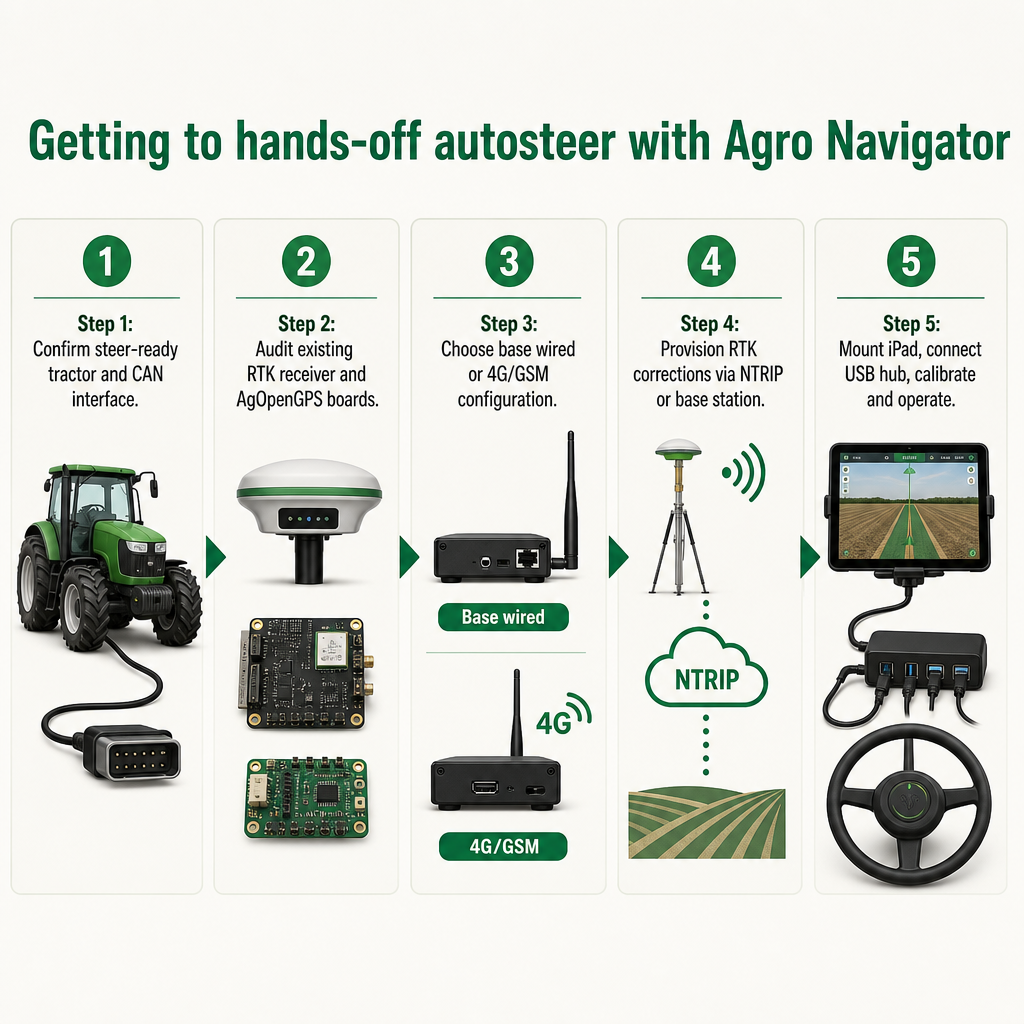
Fourth comes cab installation and onboarding: mount the iPad where the operator can see it, connect the USB hub, attach the RTK receiver, CAN adapter, and Ethernet bridge as needed, then launch the app and let it list the detected adapters in Settings. Use the Map tab to establish your AB-line-style navigation and the Serial tab to verify NMEA quality and RTK fix status before you rely on it.
Finally, run the AgOpenGPS-compatible calibration routines — steering gains and offsets — before working fields. Once calibrated, you operate on RTK autosteer while watching the app for pass-to-pass accuracy and signal quality, with telemetry and fleet monitoring available in the advanced configuration. Because autosteer physically controls the machine, it is sensible to verify local safety and compliance expectations for guidance systems with your dealer or relevant authority for your region rather than assuming a single global rule applies.
The distinction from a full DIY build is deliberate. A ground-up AgOpenGPS autosteer project means sourcing hardware, wiring, and configuring a Windows machine yourself. Agro Navigator packages the dedicated hardware, factory-compatible CAN integration, receiver compatibility, and an iOS-native app into one ecosystem, so you keep the openness of AgOpenGPS while shedding most of the assembly friction.
Choosing your configuration and next step
The decision usually comes down to scale and oversight. If you run a single steer-ready tractor and want reliable hands-off guidance on an iPad you already own, the base wired kit is the direct route. If you manage several machines, work across scattered fields, or need to monitor and report on activity remotely, the advanced 4G/GSM kit with its telemetry dashboard is the configuration built for that job.
Before you commit either way, confirm two things: that your tractor is steer-ready with a supported CAN interface, and that your existing RTK receiver and any AgOpenGPS boards match the supported serial chip families. Then settle your correction source — an NTRIP subscription or an on-farm base station — because that choice sits underneath everything the autosteer does.
For precise specifications, current pricing, supported tractor models, and a compatibility check against your exact hardware, the practical move is to contact Agro Navigator or an authorised dealer for a configuration review and installation support, rather than piecing together a Windows-based DIY stack. That conversation is also where the fleet dashboard's real capabilities and any regional considerations get confirmed against your operation.
If you want to see how Agro Navigator frames precision technology beyond guidance, its overview of Precision Planting 20/20 seeding technology shows the same emphasis on accuracy that drives the autosteer product, and its look at the benefits of terrace farming for sustainable agriculture places these tools inside a broader agronomy picture. Both reinforce why signal quality and precise field work are worth investing in.
Agro Navigator
Understand the signal behind your autosteer accuracy
Before you choose a correction source, learn how satellite geometry shapes the position your steering hardware acts on.
Read the GPS accuracy guideFrequently asked questions
Do I really need no Windows PC at all?
Correct. The traditional AgOpenGPS setup depends on a Windows tablet or laptop in the cab because the standard software only runs on Windows. Agro Navigator replaces that device with a native iOS app running on an iPad or iPhone, paired with dedicated autosteer hardware. The cab computer is your iOS device, so no Windows machine is required.
Will my existing AgOpenGPS boards and RTK receiver work?
Agro Navigator is described as fully compatible with existing AgOpenGPS community boards and RTK GPS receivers, and the app supports common USB-to-serial chip families including CP210x, CH340, FTDI, and PL2303. Many current users can reuse much of their hardware, though it is worth confirming your specific boards and receiver with Agro Navigator before buying.
What accuracy can I expect compared with standard GPS?
Basic GPS or GLONASS guidance typically delivers around 20 to 30 centimetres of accuracy, while RTK GNSS reaches centimetre-level accuracy. To achieve that, RTK needs correction data from a local base station or an NTRIP network delivered by radio or internet, so you will need to arrange a correction source.
What is the difference between the base wired and 4G/GSM models?
The base wired model connects the iPad to the autosteer control box via Ethernet over USB and suits single-machine operations. The advanced model adds a built-in 4G/GSM modem for live telemetry, remote machine monitoring, and fleet management through an online dashboard, making it the choice for multi-machine and multi-field operations.
Which iPad or iPhone do I need?
The app requires iOS or iPadOS 17 or later and works on both iPad and iPhone. It is optimised for large-screen iPad use, which improves map visibility across wide fields, so a larger iPad is generally preferable for in-cab work.
Does the system support autonomous or multi-vehicle driving?
Agro Navigator delivers RTK autosteer today, with features such as predefined path driving and multi-vehicle coordination described as planned future capabilities. Because timelines and supported models for those autonomy features are not yet specified, treat them as roadmap items and confirm current status with Agro Navigator.