
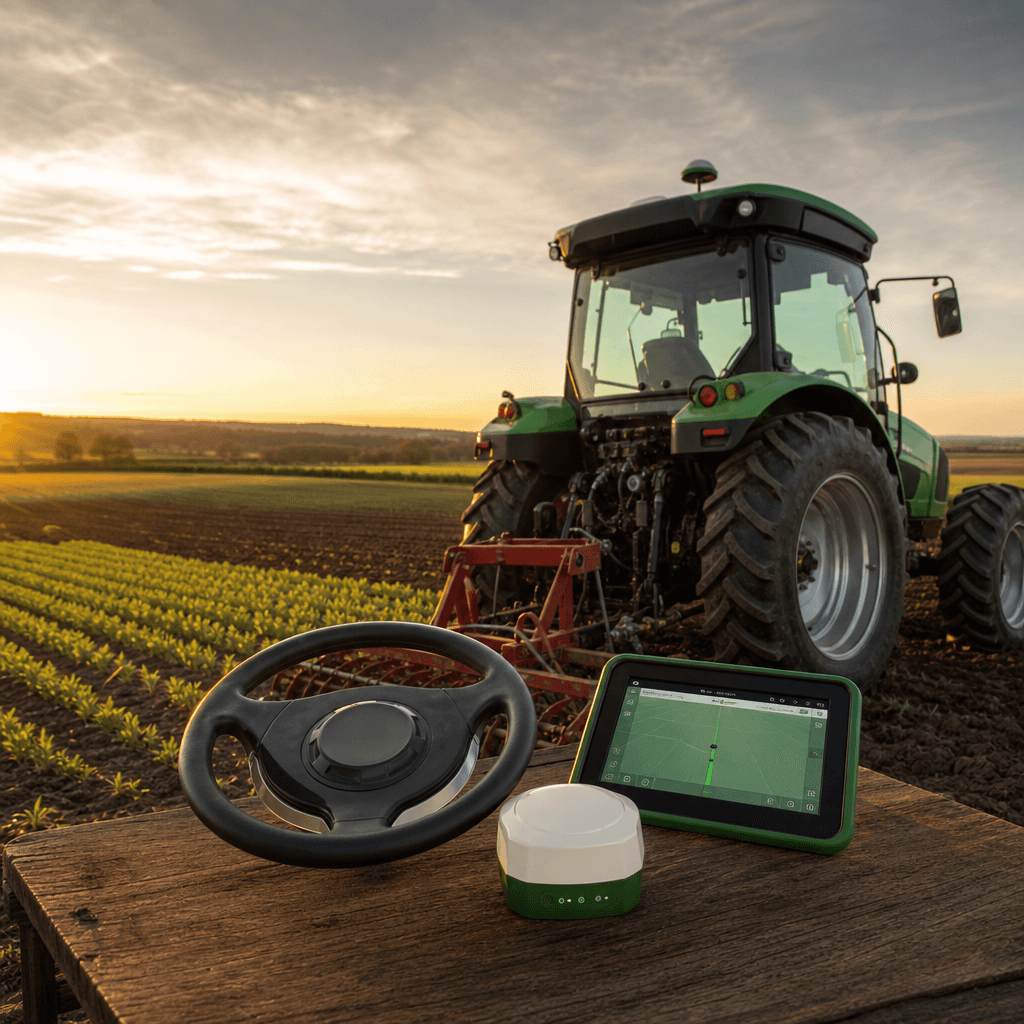
Affordable RTK Autosteer for Tractors Explained
Affordable RTK autosteer for tractors means getting consistent 2–3 cm hands-free guidance without locking your farm into an expensive display-plus-receiver bundle from a single vendor. At Agro Navigator, we deliver this by pairing a dedicated autosteer controller and CAN bus integration with a native iOS app that runs on the iPad or iPhone you already own, built on the open-source AgOpenGPS platform and designed to reuse your existing RTK GPS hardware. The result is centimetre-level steering that keeps your correction source, your receiver, and your cab device flexible instead of brand-locked.
This guide explains what the affordable path actually is, how RTK autosteer works layer by layer on a steer-ready tractor, how our hardware and app fit together, and the practical criteria for choosing the right setup for your operation.
Table of contents
- • What affordable RTK autosteer for tractors actually is
- • How RTK autosteer works on a steer-ready tractor
- • Our hardware and app: mechanisms and options
- • Decision criteria: choosing the right affordable RTK autosteer setup
- • Risks, requirements, and practical considerations
- • Frequently asked questions
What affordable RTK autosteer for tractors actually is
RTK (Real-Time Kinematic) guidance uses a high-precision GNSS receiver plus live correction data from a base station or NTRIP service to move from typical GPS errors of several metres down to roughly 2 cm positional accuracy. Autosteer then adds a controller that turns this precise position and a planned guidance line into steering commands, so the tractor follows straight or curved paths automatically while the operator supervises.
In traditional proprietary systems, this is sold as a closed package: a brand display, a matching RTK receiver, paid unlocks, and licences, often running into five-figure investments per tractor. The affordable alternative keeps the same RTK accuracy but uses open hardware, community-proven AgOpenGPS control, and a general-purpose tablet or phone as the cab interface. That combination is what cuts both the hardware bill and the vendor lock-in.
We built Agro Navigator around exactly this idea: an autosteer controller and native iOS app that work with steer-ready tractors and community RTK receivers, providing centimetre-level guidance without needing a Windows PC or a proprietary in-cab console.
The central decision for a farmer is whether to continue with a proprietary display-based system or move to an open, mobile-first setup where the main screen is an iPad or iPhone and the RTK and steering hardware are modular and reusable. In practice that decision turns on four questions:
- Is the tractor genuinely steer-ready, meaning it has factory CAN-bus steering that an external controller can command?
- Do you already have, or plan to add, a compatible RTK GNSS receiver and correction source?
- Will you standardise on iOS devices in the cab instead of dedicated Windows tablets or brand displays?
- How important are remote telemetry and fleet monitoring versus simple in-cab autosteer only?
We designed Agro Navigator for farmers who answer "yes" to steer-ready and iOS, and who want to keep the flexibility of open RTK hardware instead of tying every tractor to a single vendor ecosystem. If you are new to satellite guidance, our overview of GPS for precision farming sets the wider context for how these systems change fieldwork.
How RTK autosteer works on a steer-ready tractor
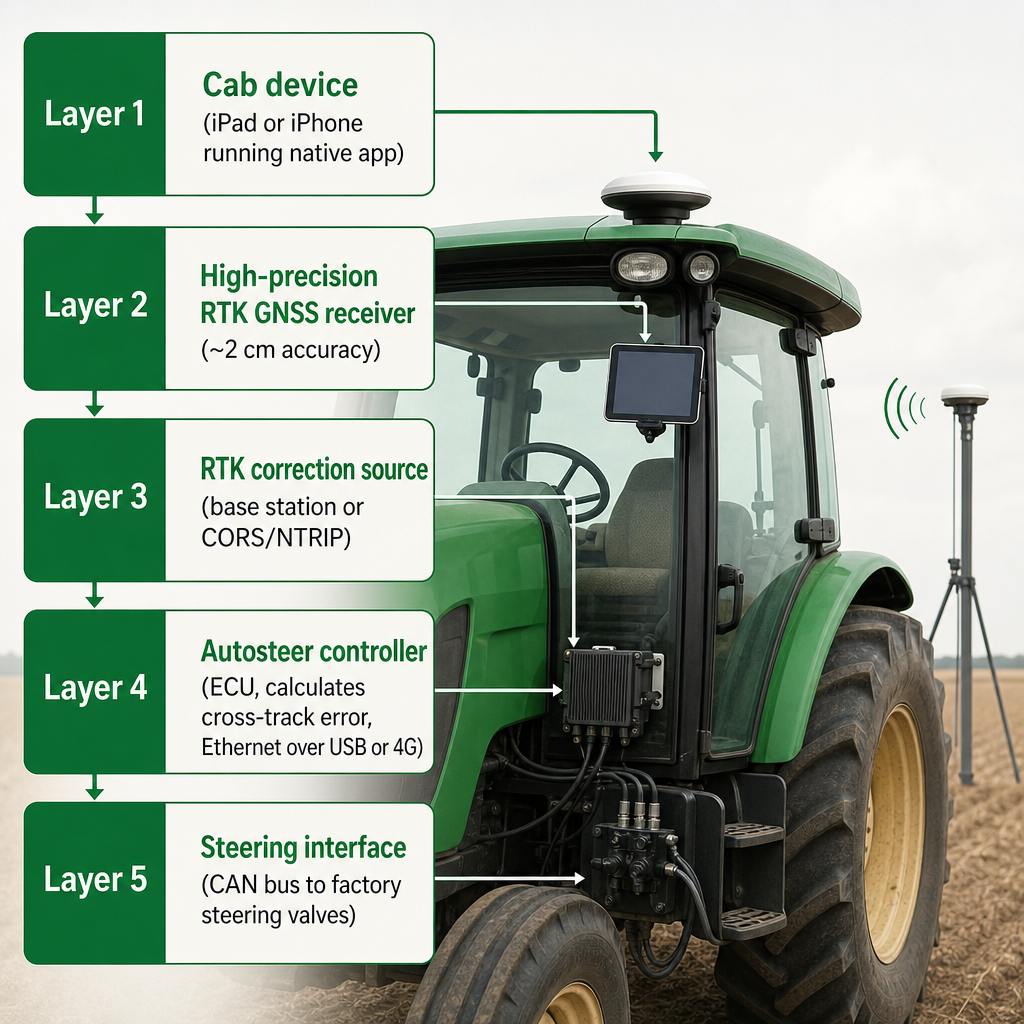
Modern autosteer systems, including ours, follow a common five-layer architecture. Understanding each layer makes it far easier to see where cost, flexibility, and risk actually sit.
The cab device is the field cockpit. An iPad, iPhone, or tablet runs guidance software that shows the field map, AB lines, implement status, and machine diagnostics. In our model, the iOS app is the primary operator interface and replaces the Windows PC used in conventional AgOpenGPS setups.
The high-precision GNSS receiver delivers centimetre-level position to the system, typically via NMEA messages over serial, USB, or network. We designed Agro Navigator to work with existing community RTK receivers rather than forcing a specific brand, provided they supply high-precision position and can consume RTK corrections.
The RTK correction source refines that position. Corrections come from a farm base station, a public or commercial CORS/NTRIP service, or a community base, streamed to the receiver to sharpen its position solution. Our workflow assumes you already have, or will choose, a suitable correction path; the system integrates with these sources rather than replacing them.
The autosteer controller is the ECU that bridges the mobile app and the tractor hardware. It reads GNSS data, calculates cross-track error (the lateral distance from the planned line), and decides the steering action needed to stay on track. In Agro Navigator, this role is handled by a dedicated module that communicates with the iOS app over wired Ethernet or an internal 4G modem, and with the tractor and receiver over CAN bus and other open protocols.
The steering interface is where commands become motion. On a steer-ready tractor, the controller sends steering commands over the CAN bus directly to the factory steering ECU and hydraulic valves, so the tractor turns without adding a motorised steering wheel. On non-steer-ready machines, AgOpenGPS historically drives an electric steering motor or a retrofit hydraulic valve block; we focus on direct CAN bus integration and compatible open hardware.
This layered design makes troubleshooting and upgrades simpler. You can change the RTK receiver or correction service without touching the steering controller, or update the iOS app without modifying hardware, as long as the interfaces remain compatible. That modularity is a direct reason open RTK autosteer stays affordable across seasons.
Our hardware and app: mechanisms and options
Agro Navigator combines AgOpenGPS-based autosteer logic with purpose-built hardware and a native iOS app, aiming to keep the system affordable while fitting cleanly into modern, steer-ready fleets.
Native iOS autosteer without a Windows PC
AgOpenGPS traditionally runs on a Windows tablet in the cab, with community-built PCB boards and Arduino-style controllers steering the tractor. We keep the open-source guidance and autosteer algorithms but move the operator interface into a native iOS app, so farmers can use the iPad or iPhone they already carry instead of installing a dedicated Windows computer.
The iOS app handles field setup, AB line management, machine configuration, and live diagnostics, while the external controller and GNSS hardware do the real-time positioning and steering work. This keeps the cab cleaner, reduces hardware duplication, and aligns with fleets that already rely on mobile devices for farm records and communication. Our detailed walkthrough of RTK GPS autosteer for iPad covers the cockpit experience in depth.
Dedicated autosteer controller with CAN bus integration
The controller is installed once on the tractor and becomes the bridge between the mobile app, the RTK receiver, and the machine's steering and implement systems. Its core capabilities include:
- Direct CAN bus integration on steer-ready tractors for autosteer and hydraulic implement control.
- Support for AgOpenGPS-compatible boards and open protocol workflows, maintaining interoperability with community hardware.
- Precise motor and hydraulic valve control where retrofit steering or implement management is needed.
- Real-time diagnostics so operators and fleet managers can see status, faults, and performance metrics.
On a steer-ready machine, we use CAN bus commands to ask the tractor's own steering valves to turn, leveraging the factory safety systems instead of bypassing them with external hydraulics or motors. This both simplifies installation and preserves OEM safeguards around speed, steering lock, and error handling.
Two hardware paths: wired base and 4G-enabled advanced
We offer two hardware configurations to match different operational needs and budgets.
| Feature | Base wired model | Advanced 4G/GSM model |
|---|---|---|
| App connection | Ethernet over USB to iPad/iPhone | Ethernet over USB plus built-in 4G modem |
| RTK autosteer via CAN bus | Yes | Yes |
| Motor/hydraulic valve control | Yes | Yes |
| Live telemetry and remote monitoring | No | Yes |
| Fleet dashboard | No | Yes |
The base wired unit is a straightforward autosteer solution that connects to the iPad or iPhone via Ethernet over USB and interfaces with the tractor steering and GNSS receiver over wired links. It delivers full RTK autosteer via CAN bus and supports motor and hydraulic valve control where required, but does not include built-in telemetry.
The advanced controller adds an integrated 4G/GSM modem on top of the base features, enabling live telemetry, remote machine monitoring, and fleet management through an online dashboard. It is aimed at operations and dealers who want to see where machines are, how autosteer is performing, and whether there are faults or downtime issues even when not in the cab.
Both versions keep the autosteer logic and hardware decoupled from the mobile device, so switching from an iPad to an iPhone or a future tablet is a matter of changing the cockpit, not reinstalling the entire steering system.
Decision criteria: choosing the right affordable RTK autosteer setup
For independent farmers, AgOpenGPS community users, small-to-medium operations, and fleet managers, the decision can be broken into practical criteria rather than just headline price.
Tractor compatibility and steer-ready status
A tractor is steer-ready when it has factory-integrated hydraulic or electronic steering that accepts CAN bus commands from an external controller, usually via an ISOBUS or diagnostic connector. Agro Navigator is designed primarily for these machines, where the controller can plug into the CAN bus and issue steering commands while the tractor manages the hydraulics and safety interlocks. Checking that status typically means confirming via the dealer build sheet or model documentation that the tractor supports external autosteer over CAN bus, inspecting for an ISOBUS or OEM diagnostic connector near the cab or steering column, and ensuring factory steering valves and wheel-angle sensing are present. If a tractor is not steer-ready, AgOpenGPS-style solutions can still provide affordable autosteer with retrofit motors or hydraulic valves, but integration and safety assessments become more involved.
GNSS and RTK infrastructure you already have
Affordable RTK autosteer for tractors is most compelling when a farm can reuse existing RTK hardware and correction sources. We designed Agro Navigator to sit on top of community RTK receivers and services rather than forcing you to buy a new, brand-locked antenna and base. Key checks: does your current receiver support RTK and output high-precision NMEA or similar data; do you have reliable access to corrections from a farm base, CORS/NTRIP, or a cooperative or commercial service; and can the receiver and controller share data over serial, USB, or network without proprietary locks. If you already run AgOpenGPS or similar DIY autosteer, we can often reuse the same RTK stack while replacing the Windows tablet and some cab wiring with a more streamlined mobile-plus-controller setup.
Cab devices and operator workflow
Farmers who already use iPads and iPhones for documentation, farm management apps, and communication are natural candidates for a mobile-first autosteer cockpit. With our app as the guidance screen, you reduce the need for separate Windows tablets or brand-specific displays and simplify what operators must learn. AgOpenGPS community users keep their open steering hardware and RTK receivers while upgrading to a native mobile interface, which is often more intuitive for multi-operator crews and seasonal workers already fluent in smartphones and tablets.
Autonomy roadmap and remote monitoring needs
Affordable RTK autosteer today focuses on guidance and hands-free steering, but many farms are already planning toward semi-autonomous workflows such as predefined path driving and multi-vehicle coordination. Our design anticipates future autonomy features on top of current autosteer capabilities, leveraging the AgOpenGPS platform and its ability to integrate implement control and more advanced path logic. The choice between the base wired controller and the advanced 4G/GSM model hinges on how much value you place on connected operations. Smaller farms with one or two tractors often prefer the base wired unit for affordable autosteer with simple cab-side setup. Larger farms, contractors, and dealers may justify the advanced model for its live telemetry, remote diagnostics, and fleet dashboard, especially where uptime and serviceability affect many hectares per day. Aligning hardware choice with operational scale keeps a path open for advanced features without overspending on connectivity you do not yet use.
Risks, requirements, and practical considerations
Any autosteer system, affordable or otherwise, carries risks and requirements that deserve explicit attention.
Technical and safety risks
Incorrect integration with steering, especially on non-steer-ready tractors, can create safety hazards if hydraulic systems or steering motors are mis-configured. Using CAN bus on steer-ready tractors reduces this risk by letting the factory ECU enforce speed limits, steering locks, and error handling, but it still requires correct cabling and configuration. RTK reliability is another consideration: if corrections drop out or GNSS reception is poor, positional accuracy will degrade, and the controller must detect and handle this gracefully. We rely on clear status reporting in the app and controller diagnostic paths so the operator can recognise and react to degraded conditions.
What real open-autosteer deployments show
Evidence from AgOpenGPS deployments shows that open autosteer systems can reach centimetre-level accuracy and be built for hardware costs in the low thousands of euros, depending on whether steering is motor-based or hydraulic. Farms have retrofitted tractors using u-blox F9P receivers and free or low-cost government RTK services, driving steering motors with community firmware while a Windows tablet runs AgOpenGPS. We extend this pattern to iOS by replacing the Windows tablet with a native mobile app and pairing it with a dedicated controller that speaks CAN bus and open protocols, reusing the same style of RTK receivers and corrections. On steer-ready tractors, this reduces installation to mounting the controller, plugging into CAN bus and GNSS, and connecting the iPad or iPhone, with calibration handled through the app. For a closer look at where the money goes, see our breakdown of RTK autosteer hardware kit cost.
Minimum requirements for our setup
For a practical, affordable RTK autosteer deployment in our model, the key requirements are:
- A steer-ready tractor with CAN bus access to its factory steering system.
- A high-precision RTK GNSS receiver and a stable correction source (base, CORS, NTRIP, or similar).
- An iPad or iPhone to run the native app as the field cockpit.
- The Agro Navigator controller in either base wired or advanced 4G/GSM configuration, fitted and configured correctly.
With these in place, most of the cost is concentrated in hardware that can be reused across seasons and, in many cases, across machines, making the system meaningfully more affordable than replacing each cab with proprietary display packages. If you are unsure whether your tractor and RTK setup fit, tell us your tractor make and model, your current receiver and correction source, and how many machines you run, and we can map the closest configuration for you.
Frequently asked questions
What makes RTK autosteer affordable compared with proprietary systems?
Affordability comes from reusing open RTK receivers and correction services, using a general-purpose iPad or iPhone instead of a brand console, and relying on AgOpenGPS-based control rather than paid unlocks and licences, which significantly reduces per-tractor cost.
Can Agro Navigator work with RTK hardware I already own?
Yes. We designed the system to integrate with existing community RTK GPS receivers that output high-precision position and accept corrections, provided they use open protocols compatible with our controller.
Do I still need RTK corrections if I use Agro Navigator?
Yes. The iOS app is only the cockpit; centimetre-level accuracy still depends on an external RTK GNSS receiver and a correction source such as a base station or NTRIP service.
Is my tractor compatible if it is not steer-ready?
Non-steer-ready tractors can use AgOpenGPS-style retrofits with steering motors or hydraulic valves, but we focus on direct CAN bus integration and steer-ready platforms. Suitability and safety should be assessed case by case.
What is the difference between the base and advanced controllers?
The base controller provides full RTK autosteer via CAN bus and wired Ethernet connectivity to the iOS app. The advanced controller adds a built-in 4G/GSM modem for live telemetry, remote monitoring, and fleet management via an online dashboard.
Does Agro Navigator replace AgOpenGPS?
No. Agro Navigator is an independent commercial product built on the AgOpenGPS platform, adding dedicated hardware and native mobile apps while remaining compatible with AgOpenGPS-style boards and workflows. It is not affiliated with or endorsed by the AgOpenGPS project.