
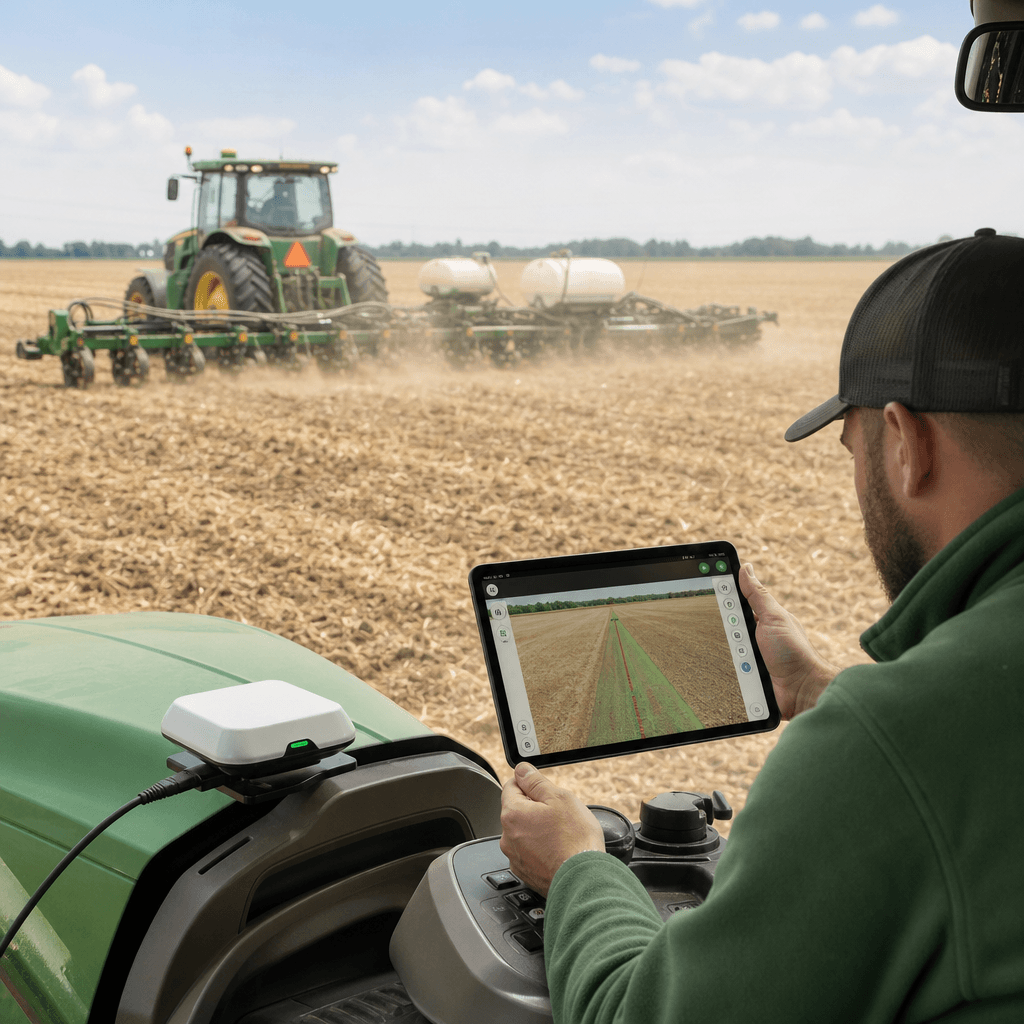
AgOpenGPS Without a Windows PC: How It Works
If you want to run AgOpenGPS without a Windows PC in the cab, the honest answer is that a phone can replace the in-cab computer screen, but it cannot replace the positioning, correction and steering hardware that make autosteer work. That distinction is the whole decision. With Agro Navigator, the Android or iOS device becomes the operator cockpit while a dedicated ECU, an external GNSS receiver, a correction source and an installed steering interface do the machine-side work. The phone displays guidance and sends high-level commands; it does not calculate centimetre-level position or drive the wheels on its own.
This guide explains where each function actually lives once the Windows laptop leaves the cab, what you keep, what you still have to supply, and how to decide whether a mobile-first setup fits your tractor. We refer you to our deeper platform explainers where they already cover a subtopic in detail, rather than repeating them here.
Table of contents
- • What a Windows-PC-free setup actually replaces
- • The four layers that are often treated as one
- • Connecting the cockpit without a computer
- • Reusing existing AgOpenGPS hardware
- • Which tractors fit a mobile-first setup
- • Limits and risks worth naming upfront
- • Deciding whether this is your path
- • Frequently asked questions
What a Windows-PC-free setup actually replaces
The standard AgOpenGPS project is usually associated with an in-cab computer running the guidance software, alongside the project's own hardware designs and software resources. Removing the Windows PC does not delete those jobs; it moves the operator-facing one onto a mobile device and keeps the rest on dedicated hardware.
That split is easiest to see as a mapping of functions to where they run once the laptop is gone.
| System function | Where it runs without a Windows PC |
|---|---|
| Operator display | Android phone or tablet, iPhone or iPad |
| Field maps and guidance | Native mobile app |
| GNSS position | External high-precision GNSS receiver |
| RTK correction input | Base station, NTRIP service or other supported path |
| Low-level machine control | Dedicated ECU |
| Steering interface | Compatible CAN, hydraulic or retrofit motor hardware |
| Local connection | Ethernet over RJ45 with a USB-C or Lightning adapter |
| Remote monitoring | Optional 4G/LTE or LoRa connectivity |
Read that table as a mobile cockpit, not phone-only autosteer. A tablet shows information and issues high-level commands; it does not supply the receiver, the RTK corrections, the steering actuator or the machine interface. Agro Navigator is a separate product that follows this model and is not AgOpenGPS itself; our compatibility statements concern interoperability with supported hardware and protocols. If you want the broader picture of how guidance and autosteer fit together on a tractor, our overview of guidance systems for tractors sets the context this guide builds on.
The four layers that are often treated as one
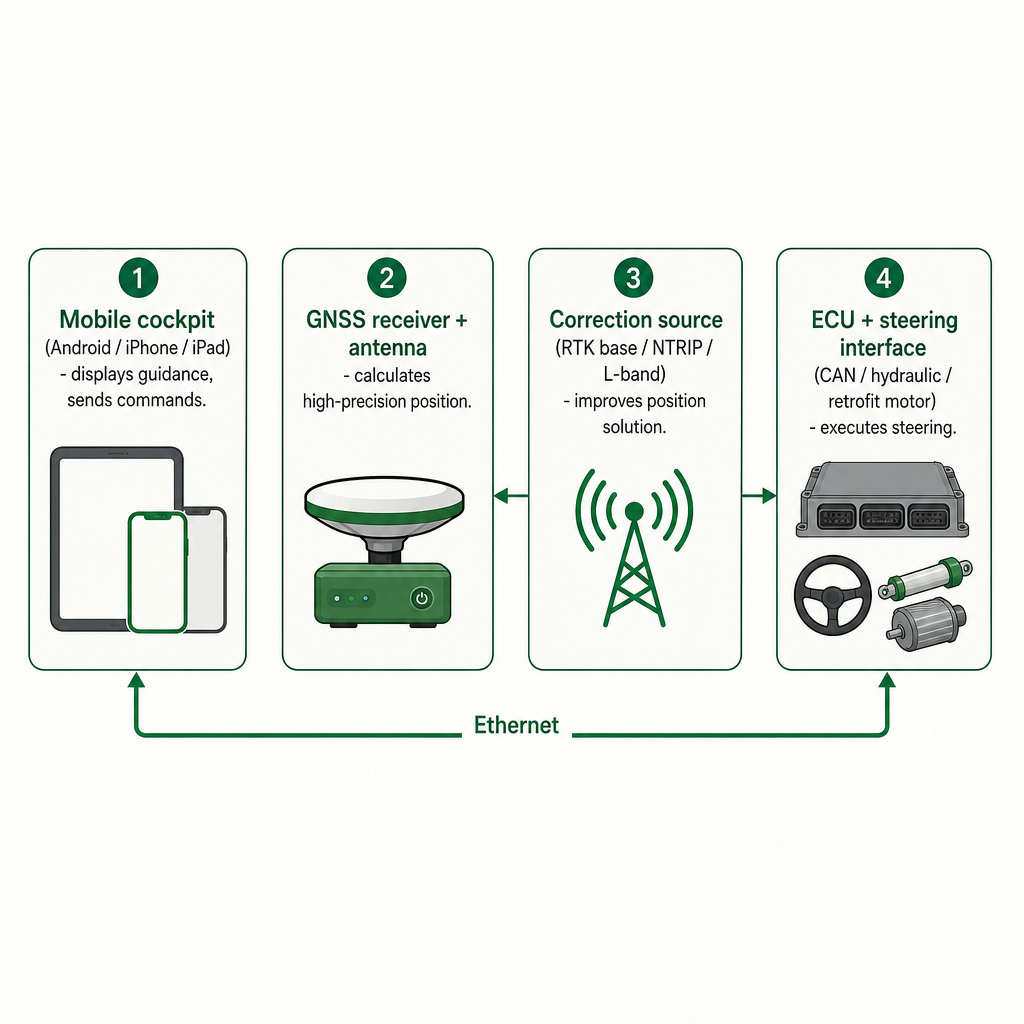
Most confusion about going PC-free comes from collapsing four distinct jobs into a single idea called "the app." Keeping them separate is what makes the setup understandable and quotable.
Operator interface: the Android or iOS device
The phone or tablet is the visible field interface. Current Agro Navigator information lists native support for Android devices, iPhone and iPad. The app handles field guidance, field planning, RTK status monitoring, coverage recording, AB-line and track guidance, setup, calibration, diagnostics and live machine status.
A tablet is usually the more practical primary display because it gives more screen area for maps, guidance lines and machine information. A phone can be useful for quick checks or a compact cab interface where the installation allows it. In all cases the device is the cockpit, not the positioning or steering system. Our AgOpenGPS for iPad explainer goes deeper on the native iOS experience if the tablet question is your main one.
Positioning: the external GNSS receiver
A phone's built-in location sensor is not an autosteer-grade GNSS receiver. Centimetre-level guidance needs a suitable external high-precision receiver and antenna. The receiver determines machine position from satellite signals and, depending on the equipment selected, may deliver data over supported serial, USB, Ethernet or other open paths. The exact receiver and protocol must be checked against the chosen ECU and app configuration.
Agro Navigator identifies high-precision GNSS hardware as a separate requirement, and the base ECU price does not automatically include a receiver. The division of labour is worth memorising: the mobile device displays position, the GNSS receiver calculates high-precision position, the antenna supplies the satellite signal, and the correction source sharpens the solution.
Corrections: how GNSS becomes RTK-capable
Raw satellite positioning is rarely precise enough for repeatable autosteer passes. RTK corrections improve the solution by feeding error information from a known reference. Agro Navigator identifies several possible correction paths, subject to receiver and configuration support: a local RTK base station, a commercial or public NTRIP network, a farm or community reference station, or supported L-band services.
NTRIP sends correction data over an IP connection, usually via mobile internet. A 4G/LTE module can help deliver corrections and carry telemetry, but it does not replace the receiver or a correction subscription. Treat "RTK-compatible" as a system requirement, not a promise that every field holds a fixed solution at all times, since network coverage, antenna installation, satellite visibility and receiver configuration all affect real behaviour.
Steering control: the ECU and machine interface
The ECU is the bridge between the mobile app and the tractor's steering hardware. It can provide the communication and control path for supported configurations, including CAN bus integration on steer-ready tractors, hydraulic valve and section I/O, retrofit steering motor interfaces, UDP and other supported open paths, plus sensor and diagnostic connections.
On a steer-ready tractor the ECU may talk to the machine's existing steering electronics or hydraulic control over CAN. A retrofit installation may instead use a motor or another actuator, which requires appropriate mechanical and electrical fitment. The ECU is not a cable adapter; it is the dedicated machine-side controller that routes data and commands between the cockpit, GNSS equipment, sensors and steering interface.
Connecting the cockpit without a computer
For a local wired installation, the Agro Navigator configurator describes an RJ45 Ethernet connection from the ECU to the phone or tablet. The mobile device may need a USB-C Ethernet adapter or, for compatible Apple hardware, a Lightning adapter. This gives the operator a direct local link, minimal dependence on mobile coverage, a clear separation between display and machine controller, and a dedicated ECU installed near the tractor electronics.
An optional 4G/LTE path is for connected monitoring, telemetry, remote diagnostics and online fleet functions, and LoRa options may be available for selected telemetry or diagnostic uses. These connectivity options are not the steering actuator; they move data, not the wheels. In areas with weak cellular coverage, a wired local connection to a base station can be more dependable than relying on an internet correction stream.
The current configurator presents the ECU as a configurable platform rather than a single universal tractor kit. The open ECU development board starts at EUR 1,490 plus VAT, but that is a starting point for the ECU board, not a complete installed autosteer price. GNSS hardware, correction services, steering interfaces, installation, connectivity and support are configured separately.
| Configuration area | Examples |
|---|---|
| Base ECU | Open board with CAN and UDP paths, RJ45 cockpit link, power input, diagnostics |
| Machine interface | Guidance only, steer-ready CAN, hydraulic valve and section I/O, or retrofit motor |
| GNSS | Optional high-precision receiver hardware |
| Corrections | RTK/NTRIP and L-band correction paths |
| Connectivity and sensors | 4G/LTE, LoRa, IMU, compute and camera options |
These are configuration categories, not proof that every combination suits every tractor. Build and confirm your machine-specific setup in the hardware configurator before quoting or ordering.
Reusing existing AgOpenGPS hardware
Sometimes you can reuse what you already own, but not universally. Agro Navigator supports selected AgOpenGPS-compatible boards, receivers, NTRIP services and open-protocol workflows, and that wording is deliberately limited to tested interoperability with specific community boards and supported configurations.
Existing equipment tends to be reusable when the receiver provides a supported high-precision position output, can receive the required correction data, and uses a compatible communication protocol; when the steering interface matches the intended machine installation; when the relevant firmware, wiring and sensors are supported; and when the complete combination has been checked with us or an experienced dealer. "AgOpenGPS-compatible" does not mean compatible with every community board, firmware version, tractor or retrofit motor. The safe habit is to verify the whole chain, not just one board.
For a deployment enquiry, send the tractor model, the existing GNSS receiver, the correction source, the steering board, the steering actuator and the relevant wiring details. Our dealer page is the right place to start a compatibility or installation discussion with those specifics in hand.
Which tractors fit a mobile-first setup
Machine compatibility is installation-specific, so a tractor being "steer-ready" helps but is not enough on its own. The current product information is aimed primarily at steer-ready tractors with a supported CAN interface, tractors that can accept compatible hydraulic steering control, machines suitable for a properly installed retrofit steering motor, and equipment where the required sensors, power, communications and safety interfaces can be fitted correctly.
The practical gap is that the steering ECU, CAN implementation, hydraulic valve arrangement, wheel-angle sensing, connector system and software configuration can differ by model and production year. Before choosing a configuration, confirm the tractor make, model and year; any existing factory autosteer or steering-ready equipment; CAN bus access and the supported message path; hydraulic valve or motor requirements; wheel-angle sensor availability; GNSS receiver and antenna mounting; correction-service coverage; and cab power and network arrangements. A retrofit motor path should only move forward after physical fitment, electrical requirements and steering behaviour have been assessed.
Limits and risks worth naming upfront
A mobile-first system removes a laptop from the cab; it does not remove the physics of positioning or the responsibility of the operator. Naming the limits early saves disappointment after purchase.
A phone or tablet does not replace the GNSS receiver, antenna, RTK correction source, ECU, steering actuator, sensors or machine installation. Centimetre-level performance is conditional: it depends on the receiver, antenna, correction service, satellite environment, installation, calibration and communication quality, so no mobile app should be treated as a guarantee of a continuous fixed solution. Compatibility is not universal, because community boards, firmware and wiring vary widely and should be confirmed as a complete combination. Connectivity can fail, which is why a local base station or another supported correction path may be preferable where cellular service is weak. Installation quality matters as much as software: a poor antenna position, weak wheel-angle calibration, unsuitable hydraulic settings or loose wiring can produce poor guidance even when the app is working.
Above all, Agro Navigator is a supervised guidance and steering aid. A trained operator must remain in control and monitor the machine, steering response, surroundings and system status. It is not a standalone emergency-stop, braking or autonomous road-use system.
Deciding whether this is your path
A Windows-PC-free mobile setup is worth investigating when you want Android, iPhone or iPad as the operator display; have a steer-ready tractor or a realistic retrofit path; already own a suitable RTK receiver or are ready to add one; have access to NTRIP, a base station or another supported correction source; can provide a compatible ECU and steering interface; are willing to verify machine-specific compatibility before purchase; and have a trained operator to supervise the machine.
It is a poor fit if you expect the phone alone to deliver RTK autosteer, need guaranteed compatibility with an untested board, lack a correction source, or want unsupervised autonomous operation. If your main question is the iOS experience specifically, our iOS app overview for farmers covers how the mobile cockpit behaves day to day. When you are ready to turn your tractor details into a concrete configuration, the configurator and our dealers are the two next steps that produce an accurate, installation-specific answer.
Frequently asked questions
Can AgOpenGPS run without a Windows PC?
A Windows-PC-free workflow is possible when the in-cab interface is replaced by a supported native mobile app and the machine-side functions are handled by compatible external hardware. Agro Navigator describes this model for Android, iPad and iPhone.
Does an iPhone or Android phone provide RTK accuracy by itself?
No. Centimetre-level autosteer requires an external high-precision GNSS receiver, antenna, correction source, ECU and compatible steering hardware. The phone displays position; it does not calculate it.
Can I use an iPad instead of a Windows computer?
Yes, an iPad can serve as the operator cockpit in a supported configuration. It still needs the right connection to the ECU and the required external GNSS, correction and steering hardware.
Does the system work with every AgOpenGPS board?
No. Compatibility is limited to supported and tested boards, protocols and configurations. Check the current configurator and confirm the complete installation with us or a dealer.
Is the EUR 1,490 price a complete autosteer system?
No. The configurator lists EUR 1,490 plus VAT as the starting price for the open ECU development board. GNSS, correction services, steering interfaces, installation, connectivity and support may be configured separately.
Does removing the Windows PC make the tractor autonomous?
No. The mobile app and ECU support supervised guidance and steering in compatible installations. The operator must remain in control; this is not an autonomous driving, braking or emergency-stop system.